Puh, that’s a long title. I’m working on Mac OS X and use Virtualbox to run Windows XP as a guest operating system. Virtualbox runs exceptionally well and it’s even free. But the keyboard mapping is problematic since Windows XP assumes a standard PC keyboard. The layout of the Apple keyboards is different, so if you are not a Windows guy, you’ll have troubles to find the backslash ‘\’ or ‘@’. I was looking for a solution for a long time now, but didn’t find anything until now. Stefan Bohm actually published a solution for the same problem if you run parallels. He provided a new keyboard layout for installation (the layout is called ‘Parallels Keyboard Map’) as well a registry hack so that the ‘alt’ keys work as expected.
Homepage (German): Mac Tastatur Belegung für Parallels (Deutsch – DE)
Download: parallels_keymap_de.zip (original copy), parallels_keymap_de.zip (local copy)
Installation
Download and extract the zip file. Install the keyboard layout by double-clicking on ‘setup.exe’ and run the registry hack ‘altgr.reg’ to map the left alt-key on altgr. I’m not sure if you need a reboot here (can’t remember) but it doesn’t harm. Then choose the new keymap, by pressing the right mouse button on the ‘DE’ button in the language bar in the task bar and choose “Settings…”. Choose “German (Germany) – Parallels Keyboard Map” as the default input language.
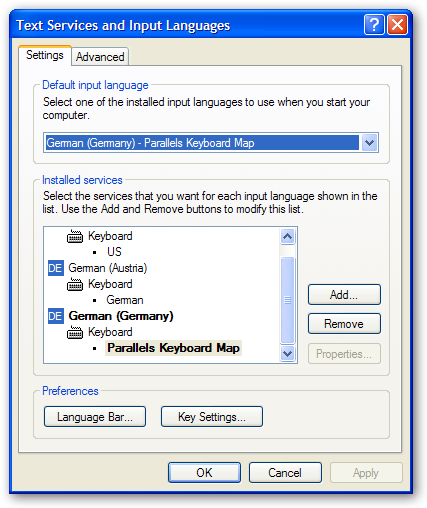
After that you must at least logout/login or reboot – hey, it’s Windows after all, isn’t it!
English keymap anyone?
I haven’t tested that, but this keymap was made with The Microsoft Keyboard Layout Creator. You could load the german layout (File->Load existing keyboard…, choose ‘Parallels Keyboard Map’) and change the mapping for an English keyboard accordingly. Then make an install package (Project->Build DLL and Setup package) and you are done. You’ll still need the registry hack.
Some more links:
Thank you! found this site useful. I am on the verge of creating a VBox English keyboard layout. I shall like to upload it unto your site when finished.
created a working layout. wher do i upload it?
Hi ibee,
that’s great news! Could you just send it to me smekal@iap.tuwien.ac.at and I’ll upload it.
Thanks,
Werner
Thank you, your post has helped me create an English UK layout, you’re welcome to host a local copy here for the ease of future googlers.